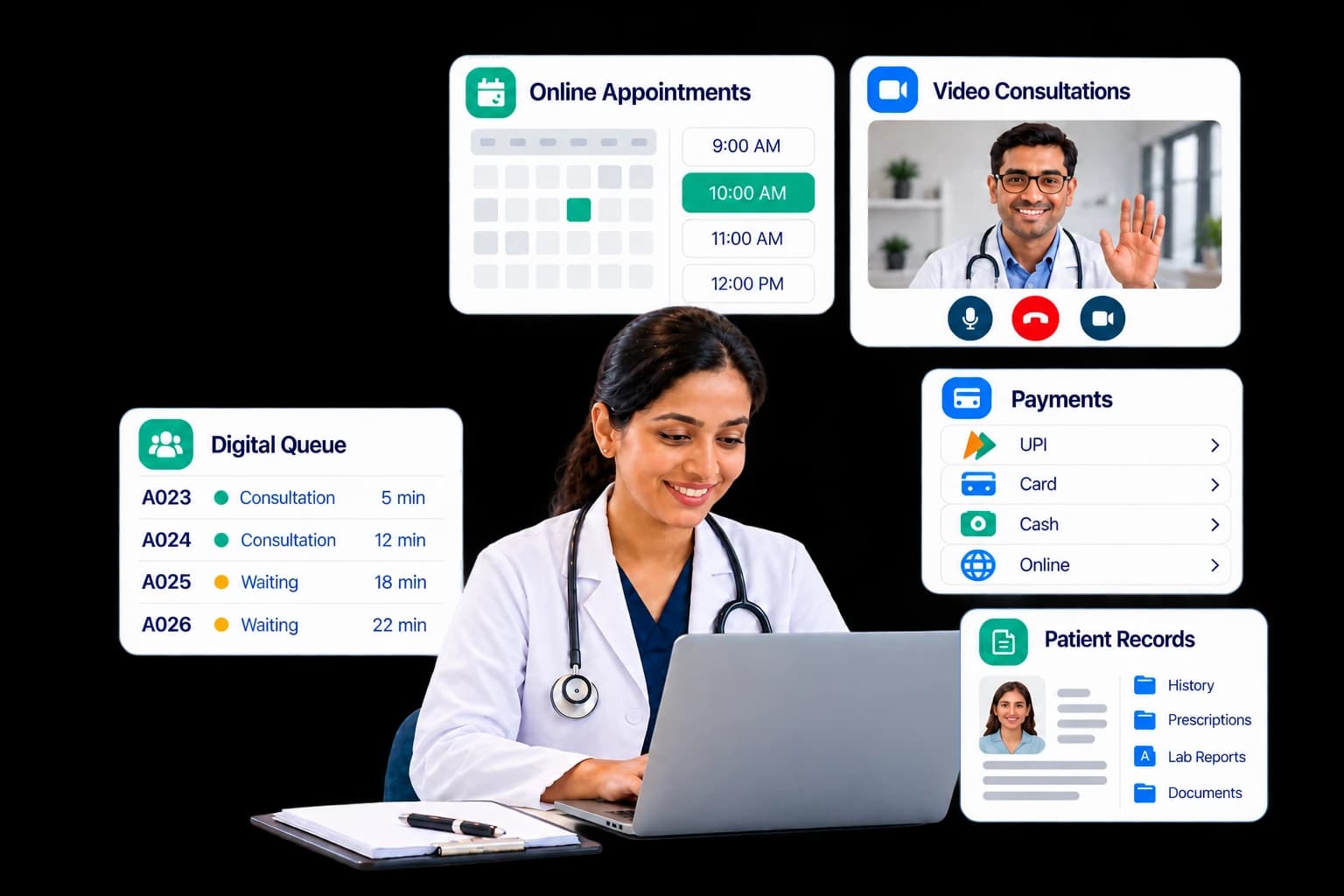
A virtual clinic platform helps small clinics manage growth through one connected system. It combines online appointment booking, queue handling, records, payments, and video visits in a single system, so a small team serves more patients without adding tools, staff, or manual steps.
Table of Contents
- Why Growth Feels Hard for Small Clinics
- The Simple Rule: Add Capacity, Not Complexity
- Signs Your Clinic Is Ready for a Virtual Clinic Platform
- Six Steps to Grow Without Extra Complexity
- What Changes for Each Role
- Traditional Clinic vs. Virtual Clinic Platform
- How to Choose Clinic Management Software
- Common Mistakes to Avoid
- Conclusion
- Frequently Asked Questions
Why Growth Feels Hard for Small Clinics
Most small clinics can find patients. The harder task is serving more of them with the same team. Every new patient adds phone calls, paperwork, payment checks, and follow-ups. When these tasks live in a notebook, a phone, and several separate apps, growth creates chaos instead of income.
Missed appointments show the cost clearly. Industry research summarized in a June 2026 guide from Certify Health shows that no-show rates in ambulatory clinics range from 5% to 34%, depending on specialty and patient group. High-performing clinics aim for under 10%, while anything above 20% usually signals a scheduling or access problem.
A real-world case comes from a peer-reviewed study on PubMed Central. Across 4,641 scheduled appointments at an urban outpatient clinic in 2023, 18.4% were missed, and the typical gap between booking and visit was 42 days. Long waits and missed visits often go together.
Here is a simple example. Say a clinic books 40 visits a day and 15% are no-shows. That is 6 empty slots daily. At a ₹500 fee, the clinic loses ₹3,000 a day, or about ₹78,000 across 26 working days. This is an illustration, not a benchmark, but the same math applies at any fee level.
Hidden complexity usually comes from five places:
- Booking only by phone
- Paper or verbal queues
- Manual reminders and follow-ups
- Billing kept apart from records
- No weekly view of key numbers
The Simple Rule: Add Capacity, Not Complexity
Healthcare practice management is the work of running the business side of care: scheduling, billing, records, staffing, and compliance. Modern clinic management does this with fewer tools, not more.
Before adding any tool, ask three questions:
- Does it replace a manual task, or just add a new one?
- Can patients and staff both use it with little training?
- Does it share data with the rest of the clinic?
A virtual clinic platform passes all three tests when it covers booking, queues, video visits, records, and payments under one login. Our guide to virtual clinic software explains the main types and features in more detail.
Note that a virtual clinic platform is broader than a video-call app. A video app handles one task. A platform also manages booking, queues, records, billing, and reporting, so it replaces several tools instead of adding one.
Signs Your Clinic Is Ready for a Virtual Clinic Platform
Look for these warning signs:
- Reception staff spend most of the day on the phone.
- Patients complain about long or unclear waits.
- Doctors lose time searching for old records.
- Cash and card totals do not match at day’s end.
- You turn away video consultation requests.
- You cannot say last month’s no-show rate.
If two or more apply, your clinic is likely ready for one connected system.
Not sure where to start? Fill out our short contact form and our team will help you plan the right setup for your clinic.
Six Steps to Grow Without Extra Complexity
Step 1: Start with online appointment booking
Phone-only booking caps growth, because staff can answer only one call at a time. Online appointment booking lets patients see real-time slots, choose video or in-clinic visits, attach reports, and pay in one flow. Staff then focus on exceptions instead of routine bookings. The same flow works for family members and for patients booking across branches.
Set the basics once: slot length, maximum patients per slot, consultation fee, and cancellation window. After that, the system applies them to every booking.
Strong appointment management also gives staff one calendar to accept, decline, reschedule, and cancel visits. One industry compilation reports that self-scheduling tools cut no-shows by 29%, and that 71% of patients believe more same-day or next-day slots would reduce missed visits. Treat these figures as directional, since they come from vendor research.
Step 2: Digitize walk-ins and the waiting queue
Walk-ins help growth but get messy without a system. A digital queue lets the front desk register a walk-in, assign an available doctor, and issue a token number in seconds. A live board shows waiting patients by doctor, and staff can call the next patient, skip, or reorder the line. Patients with in-clinic visits can also see their queue position on their phones, which means fewer questions at the desk and less crowding.
Also review your booking channels, meaning walk-in, online, and phone, to see which one to grow. The daily footfall view also shows peak hours, which helps you plan staff shifts.
Step 3: Automate reminders to cut no-shows
Reminders are one of the simplest ways to reduce missed appointments. Set up SMS, email, and WhatsApp templates once, then let the system send them. Send marketing messages only to patients who have opted in. Real-time notifications keep patients informed about appointments, payments, and prescriptions.
A 2024 systematic review in Health Science Reports found no-show rates between 12% and 42% in some studies. It also explains that shorter gaps between booking and visit make patients less likely to forget and more likely to attend.
Access models matter as well. Same-day urgent care settings report no-show rates of 2% to 8%, compared with 12% to 15% in primary care practices. So offer near-term slots, send a reminder after booking and again before the visit, and give patients one-tap rebooking for follow-ups.
Step 4: Add video visits without adding tools
Virtual care extends your reach without new rooms. Choose a system where video runs in the browser, so patients need no app download. Look for a pre-call device check, a virtual waiting room, in-call chat, and screen sharing. Doctors control call recording, and patients give digital consent before a telemedicine visit.
Doctors should mark each time slot as virtual, in-clinic, or both, which keeps one schedule instead of two. Privacy matters too. HIPAA is a US law, but its safeguards are a common benchmark, so review our checklist for a HIPAA telehealth platform before you go live.
Step 5: Move records online and connect to ABDM
Digital records save time on every visit. Doctors can record vitals, write structured notes, and issue e-prescriptions from templates, while patients can view past prescriptions and reports. AI tools add more value here. For example, AI visit comparison highlights what changed in vitals, medications, and lab results between two visits, so doctors review history faster.
In India, the Ayushman Bharat Digital Mission (ABDM) makes digital health integration increasingly relevant for clinics. As of 10 July 2026, the mission had created more than 93.95 crore ABHA health IDs, linked over 105 crore health records, and registered 5.33 lakh facilities and 9.85 lakh healthcare professionals. Nearly 24 crore Scan & Register tokens had also been generated to speed up outpatient registration. Clinic management software with ABDM support lets a small clinic take part in this network.
Step 6: Review a few numbers every week
You cannot manage growth you cannot see. Use a dashboard to track five numbers, and spend 15 minutes each week comparing them with the previous month:
- No-show rate: missed visits divided by booked visits; aim for under 10%.
- Cancellation rate: shows whether your cancellation window works.
- Average consult time: reveals where doctors need more time or fewer slots.
- Revenue and outstanding payments: shows cash flow at a glance.
- Wait time: shows whether the queue is helping patients.
Add a second branch or more doctors only after these numbers stay steady. Larger groups weighing a similar decision can read whether a virtual healthcare platform is worth it for hospitals.
A Simple 30-Day Rollout
- Week 1: Add doctors, departments, and schedules.
- Week 2: Turn on online appointment booking and payments.
- Week 3: Start the digital queue and automated reminders.
- Week 4: Launch video visits and review your first dashboard.
Have a question about your rollout? Chat with us on WhatsApp and get quick answers from our team.
What Changes for Each Role
One platform serves four groups, and each sees only what it needs:
- Clinic admins manage staff, branches, billing, branding, and reports from one place, and can view each doctor’s performance.
- Doctors run video or in-clinic consultations, write e-prescriptions, and follow a live daily queue.
- Receptionists register walk-ins, check patients in, collect payments, and close the day with a summary report.
- Patients book, pay, join video visits, and keep their family’s records in one app.
Traditional Clinic vs. Virtual Clinic Platform
The table below compares both models side by side.
| Area | Traditional Setup | Virtual Clinic Platform |
|---|---|---|
| Booking | Phone calls and notebooks | Online appointment booking, open 24/7 |
| Walk-ins | Paper lists and called-out names | Digital tokens and a live queue board |
| Reminders | Manual phone calls | Automated SMS, email, and WhatsApp |
| Consultations | In-person only | In-clinic and browser-based video |
| Payments | Cash and separate billing | UPI, card, cash, and pay-later in one system |
| Records | Paper files | Digital records and e-prescriptions |
| Reporting | Month-end guesswork | Real-time dashboard with PDF, Excel, CSV exports |
| Staff workload | Rises with every patient | Rises slowly, since routine tasks are automated |
How to Choose Clinic Management Software
Use this checklist when comparing clinic management software:
- One login per role: separate views for admin, doctor, receptionist, and patient.
- Booking and walk-ins: both handled in one calendar.
- Payments: UPI, card, cash, invoices, and gateways such as Razorpay or Stripe.
- Messaging: SMS, email, and WhatsApp templates, plus patient consent for marketing messages.
- Video and in-clinic modes: no app download for patients.
- Records and ABDM support: e-prescriptions, clinical coding, and consent-based record sharing.
- Security controls: two-factor sign-in, automatic sign-out, audit logs, and digital consent forms.
- Reports: exports to PDF, Excel, or CSV.
- Room to scale: multiple branches, extra doctor seats, and flexible plans.
Platforms such as InClinic bundle these capabilities across different user roles, giving clinics a single system to manage their daily operations.
Common Mistakes to Avoid
- Buying a separate tool for each task. Every extra login adds training time and data errors.
- Switching everything at once. Roll out in phases so staff can adapt.
- Skipping staff training. A short session for each role prevents most early mistakes.
- Ignoring consent and privacy. Store patient consent and limit access by role.
- Not telling patients. Share your booking link on WhatsApp and your clinic website so patients know online booking exists.
- Not measuring results. Without weekly numbers, you cannot tell what is working.
Conclusion
Growth does not require a bigger, busier clinic. It requires a smoother path for every patient: book online, arrive to a clear queue, consult in person or by video, pay easily, and receive follow-ups on time. A virtual clinic platform delivers that path with one system, so a small team can serve more patients while keeping daily operations simple. If you manage multiple locations, the same approach works branch by branch. Start with online appointment booking and reminders, measure the results, and add features one step at a time.
Ready to simplify your clinic? Fill out our contact form or message us on WhatsApp to get started.
Frequently Asked Questions
What is a virtual clinic platform?
A virtual clinic platform is software that runs online appointment booking, video and in-clinic visits, queues, records, payments, and reports from one system. Patients use one app, while doctors, receptionists, and admins each get their own dashboard built for their daily tasks.
What is clinic management software?
Clinic management software handles daily clinic tasks such as scheduling, patient records, billing, prescriptions, and reporting. A virtual clinic platform adds remote video consultations, online payments, and patient-facing tools on top, so the whole patient journey stays in one connected system.
How can a small clinic grow without hiring more staff?
Automate routine work first, including online booking, reminders, queue tokens, and digital invoices. When software handles these repetitive tasks, the same team can serve more patients without extra hires or extra tools.
How to reduce patient no-shows?
Shorten the wait between booking and visit, send reminders by SMS or WhatsApp, and make rescheduling easy. Then track your no-show rate every month and aim for under 10%, the benchmark high-performing clinics target.
Why do small clinics need online appointment booking?
Patients can book at any hour, and staff answer fewer routine calls. The calendar also updates instantly, which helps avoid double booking and keeps doctors’ schedules full, so the clinic grows without adding front-desk workload.